
How to Write a Blog That Gets Picked Up by Google and AI Search
TL;DR If your impressions are up but your clicks are down, AI search is probably why — and it's fixable. The fix isn't more content. It's clearer, more specific content that AI can actually cite. Answer the question in your first paragraph, use clean headings, include a FAQ and a summary block, and weave your brand name into the post itself. Then test it — go ask ChatGPT or Perplexity your own question and see who shows up. If it's not you, look at what is and make yours better.

Your content is doing the work. AI is getting the credit.
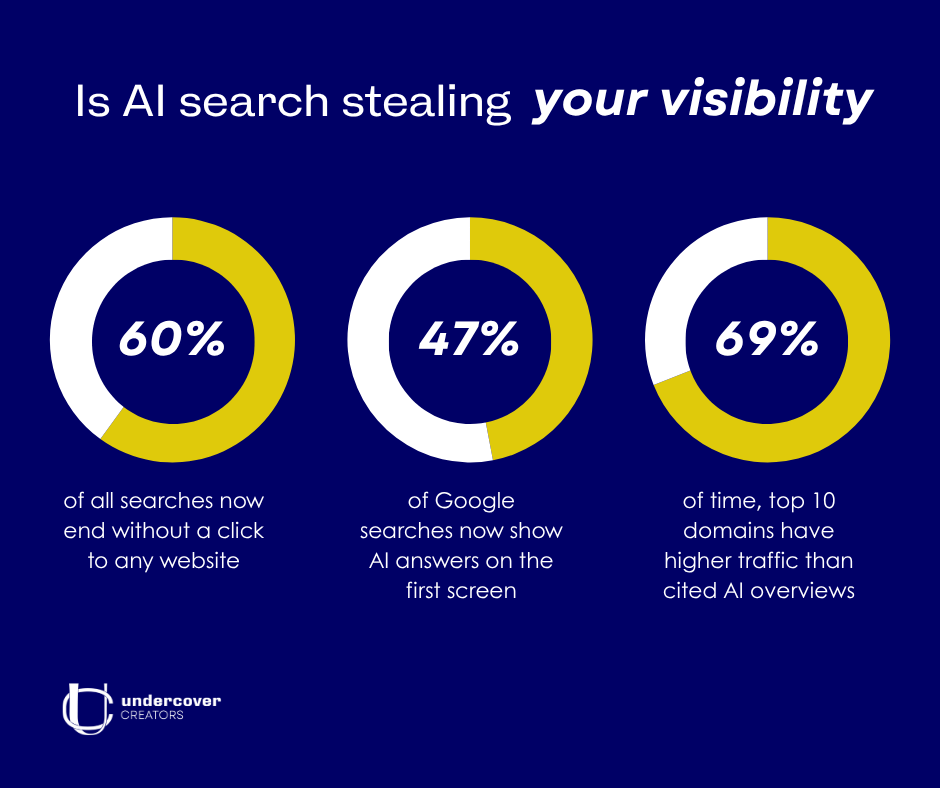
According to Bain & Company, about 60% of all searches now end without a click to any website — and for AI-specific searches, that number is even higher.
So if you've been publishing blogs consistently, you might notice your impressions are up but your clicks down, it likely has to do less with your actual content and more with AI.
AI tools like ChatGPT, Perplexity, and Google's AI summaries are reading your blog posts and answering people's questions directly — without sending anyone to your site.
I manage content for Undercover Creators and for our clients, so when I started seeing this pattern (more visibility, less traffic) it was kinda unsettling. But once I understood what was actually happening, I realized I just had to reframe it.
The goal isn't just to rank anymore. It's to be useful enough that when an AI tool summarizes your topic, it says your name.
The good news is that there’s lots of overlap in writing for AI search and writing for Google. Both reward clear, specific, trustworthy content. The difference is in a few key habits and once you know them, they're not hard to build in.
This guide walks through exactly what to do, based on years of writing content for businesses across industries and testing what actually gets picked up. I'll share what works, what doesn't, and the mistakes I see most often.
AI Tools Don't Send Clicks — They Send Attribution
Here’s how AI search actually works: when someone types a question into an AI tool, it looks at multiple top sources across the web (from what I’ve read, usually somewhere between two and six), synthesizes the information, and delivers a direct answer. No click required.
It runs the user's exact question first. If the results are thin, it fires off follow-up searches with variations to fill in the gaps. That means your content needs to be the clearest, most direct answer to a specific question. A broad overview of a topic will rarely get selected as the source.
What this means practically is that every blog post now has two jobs. The first is showing up in search results. The second is being useful enough and specific enough that when an AI tool reads it, it incorporates your thinking and, ideally, mentions your name.
A Hack for Brand Attribution
Generic information posts get summarized and forgotten. But if you write content framed around your brand — like '5 ways Undercover Creators approaches content strategy' or 'How we use our Voice Alignment Framework™ to align your mission, audience, and voice with your goals — the AI has to construct a sentence that says your name. That's brand presence even without a click to your site.
This is the shift that’s changing how I approach content for clients. I’ve stopped writing posts 'about' topics and started to write posts that answer a specific question with a point of view. No more 'Social Media Tips for Small Business' blogs and more 'Why Most Small Business Social Media Feels Generic (And What to Do Instead)’ blogs. Because one is forgettable. The other is citable.
6 Things That Help Your Blog Get Found by Google and AI

1. Answer One Specific Question Per Post
AI tools run the user's exact question first. So a post built around a clear, specific question has a significant advantage over a broad topic piece. Think about what your ideal client is actually typing into Google or ChatGPT or whatever search bar they’re using at 11:00 at night.
That question becomes your title. And the answer to it should appear in your very first paragraph.
It may seem counterintuitive because you want them to read the whole thing. But if people can’t find what they’re looking for in less than a minute, they’ll bounce anyway. If you give them their answer and want the detail, they will keep reading.
It also matters if you want AI to select you as a source. AI tools pull from the first few sentences after each heading when building their summaries. Write every section as if it might be read in isolation. Lead with the answer, then support it. If you bury the point, then both AI and a real person will just move one.
That’s a very common mistake I see actually. And I used to do the same thing. I’d spend the first three paragraphs warming up to the answer because it feels more natural when you're writing. But most readers (and AI tools) only scan anyway so they can skip straight to where the actual information starts. Give them the answer first. Then give them the story.
2. Structure Your Post So It's Easy to Scan and Extract
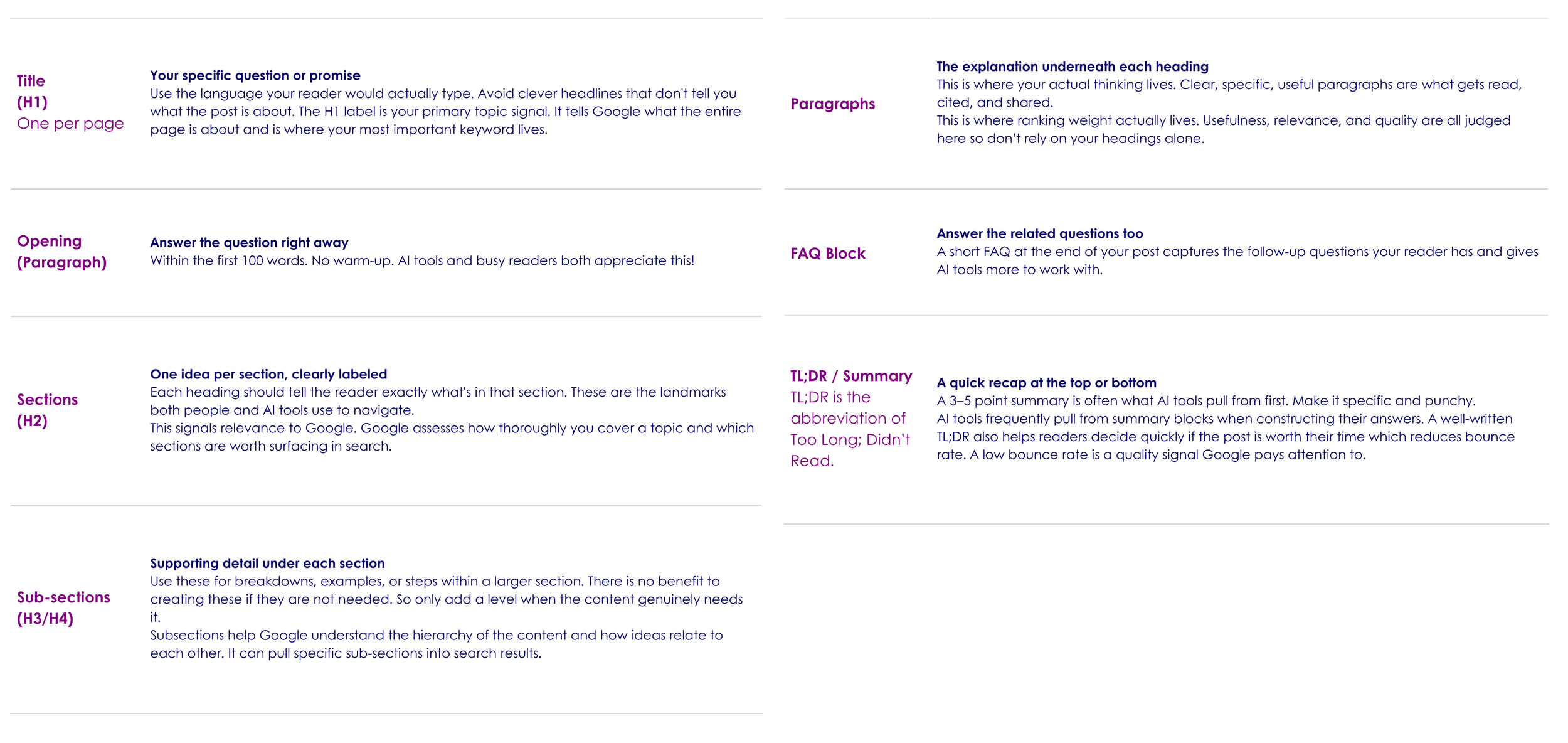
Both search engines and AI tools benefit from content that's well-organized and clearly labeled. Each section should be clearly named and each paragraph should be focused on only one idea.
Here's the structure that tends to perform well:
3. Show That You Actually Know What You're Talking About
Google has long evaluated content on what it calls Experience, Expertise, Authoritativeness, and Trustworthiness (E-E-A-T). AI tools are also trained to prioritize credible, specific, experience-backed content over generic summaries.
Here's a few examples how to show Google and AI tools that you've actually done the thing you're writing about.
Specific numbers over vague claims
‘Open rates improved 23% over six weeks' is something that would more likely get cited. 'Email marketing can improve engagement' would probably get passed over.
Cite where your data comes from
Link to studies, reports, or original sources. It signals that your claims are grounded and you’re not making things up or guessing.
Real examples from your work
Reference actual client situations (anonymized if necessary), your own case studies, or outcomes you've seen firsthand.
Keep your content current
Include publish dates and update your posts when things change. AI tools give precedence to fresh, maintained content over static pages.
The biggest credibility shift I've made in my own writing is getting more specific. I used to write in general terms to keep things broadly applicable. But when I started including specific processes, named frameworks like our 5-Point Content Clarity Blueprint™, and real outcomes from client work, the posts started performing differently. Specificity is credibility.
4. Write the Way People Actually Talk and Search
Search engines have gotten very good at understanding meaning, not just matching words. AI tools are even better at this because they're trained on conversations, books, and real human language. Writing stuffed with repeated keywords reads as low quality to both.
Instead, write the way your reader would actually say the thing. If you're writing about content strategy for small businesses, use the language your clients use when they describe their problem and not the industry term for what you do.
Conversational headings also tend to perform better with AI tools. 'How does content strategy work for small businesses?' will often surface more naturally than 'Content Strategy: Small Business Guide.' The first is a question someone actually asks. The second is a label.
5. Make Sure Search Engines Can Actually Find and Read Your Site
This is the behind-the-scenes stuff that most of us don’t think about unless you’re a website or SEO specialist. But if your website is slow, disorganized, or accidentally blocking certain search tools, none of the content will work for you anyway.
A few things worth checking:
Page speed — slow sites get deprioritized. I like Google’s PageSpeed Insights tool and it’s free if you’d like to check yours!
Mobile experience — Google now looks at the mobile version of your site first when it’s deciding where to rank it.
Clean URLs — your page addresses should be readable and descriptive, not a string of numbers and symbols.
Schema markup — this is code that tells search engines exactly what kind of content is on your page (an article, a FAQ, a how-to guide). Most website platforms have plugins that add this automatically.
Robots.txt file — this is a file on your website that tells bots what they can and can’t read. Accidentally blocking the wrong pages here can limit how visible your content is to search engines and the AI tools that rely on them.
I don’t claim to be an expert with that back end stuff, but I do remember our SEO guy telling us he had a client that experienced an issue with that last one. There was a security plugin that had added a blanket rule that was blocking several AI crawlers — including the ones used by ChatGPT and Perplexity. The posts were ranking fine in Google, they just never appeared in AI-generated answers. So if you notice that happening to you, it could be a quick fix to one settings file. It's worth having someone check this if you're not sure.
6. Test Your Content in Real Search and AI Tools
The old content approach was to find a keyword, write a post, and then wait and see. Now there's a new step. Test it!
Here’s a simple test you can do. After writing your post, go to ChatGPT, Google Gemini, ClaudeAI, Perplexity, or whatever your favourite AI tool is, and ask the exact question your post is meant to answer. See what comes up. If your site isn't there (or isn't cited well), look at what is. What does that content have that yours doesn't?
Find out what they’re doing differently. Are they more specific? Better organized? More directly answering the question? Then go back to your post and adjust.
This is a great feedback loop you can use for yourself that traditional keyword research can't give you. Do it regularly for your most important posts.
This is honestly the part of content strategy I find most energizing right now. It's no longer a guessing game. You can test your content in real time against the exact tools your audience is using. You can see what's working and why. For someone who believes deeply in clarity and authentic communication, this feedback loop feels like a gift. It rewards the blogs that are actually useful and authentic, not just optimized.
A Quick Checklist to Check Visibility Before You Hit Publish
✓ Title is a specific question your reader would actually ask
✓ Post includes a summary or TL;DR (3–5 points)
✓ The answer appears in the first paragraph — no warm-up
✓ Each section has a clear, descriptive heading
✓ Your name or brand appears in the body of the post
✓ Content includes specific details — numbers, outcomes, examples
✓ There's a FAQ section with related questions
✓ Meta description clearly states what the post answers
✓ Images have descriptive alt text
✓ AI crawlers are not blocked in your site settings
✓ Tested in an AI tool to see how it responds to your question
AI Search Is Not A Threat To Good Writing
I’ve had a lot of people ask me if I’m worried that AI will replace my job. And my answer is no.
It’s a tool and it's a filter. Content that was written to check a box or that was optimized for a keyword without a real point of view has always been “bad writing”. Now, there’s just more of it and it’s getting even easier to ignore.
Content that's specific, authentic, and genuinely helpful is showing up more now than ever because you no longer have to be on page one of Google to be found. And the tools people use to search are now sophisticated enough to reward exactly that.
At Undercover Creators, we've always believed that the best content comes from clarity about who you are, what you know, and who you're talking to. If that’s what you’re writing about, and you check all the boxes on our checklist, you’ve got a great shot at improving your visibility and being found by Google and AI Searches.
If writing’s just not your thing, we offer free new client consultations. Book in with us and we’ll see if we’re a fit to work together.

“Write like you're answering a question for a real person who genuinely needs help. Be specific. Have a point of view. Use your actual experience. That's not just good content strategy — it's the only kind of content that's going to keep working as search continues to evolve.” – Lindsay Fuchs
FAQ’S
Does AI search mean blogging is dead?
No — but the reason you blog has to shift. Blogging was never really about driving clicks. It was about demonstrating expertise, building trust, and showing up for the people looking for what you offer. AI search doesn't change any of that. It does mean that thin, generic content — posts written to check a box rather than actually help someone — have even less value than before. If your content is specific, useful, and written with a real point of view, it has more reach now than ever. You just won't always see it in your click count.
Do I need to write differently for AI tools than I do for Google?
Not as differently as you might think. Both reward content that's clear, specific, and genuinely useful. The biggest adjustment for AI is structural — answering the question right away, using clear headings, and including a summary or TL;DR. AI tools scan for direct answers. If your post buries the point, they'll move on to a post that doesn't.
How do I know if an AI tool is actually finding my content?
Test it yourself. Go to ChatGPT, Perplexity, Google Gemini, or whichever tool your audience uses most and ask the exact question your post is meant to answer. See what comes up. If your content isn't being cited, look at what is and ask yourself honestly: is that post more specific? More organized? Does it answer the question faster? That comparison will tell you more than any keyword tool.
How long should a blog post be?
Long enough to fully answer the question — and no longer. There's no magic word count. A 600-word post that directly and completely answers a specific question will outperform a 2,000-word post that wanders. That said, posts that cover a topic thoroughly — including related questions, a FAQ, examples, and a summary — tend to give AI tools more to work with. Focus on being complete, not long.
Should I be using keywords in my blog posts?
Yes, but not the way people used to think about it. You don't need to repeat a phrase a set number of times. What matters is that your title, opening paragraph, and at least one main heading use the language your reader would actually type when searching for this topic. After that, just write naturally. Search engines and AI tools understand meaning — they don't need you to force in the same phrase over and over. In fact, that signals low quality to both.
What's a meta description and do I actually need one?
A meta description is the short summary that appears under your page title in search results. It doesn't directly affect your ranking, but it does affect whether someone clicks. Think of it as a one-sentence answer to the question your post covers. Keep it under 160 characters, make it specific, and write it like you're talking to a real person — not a search engine. Every post should have one.
How often should I publish new blog posts?
Consistency matters more than volume. One well-researched, clearly written post per week will outperform four rushed ones. If you can only manage one post every month, that's fine — just make it count. What you want to avoid is publishing a burst of posts and then going quiet for months. Search engines interpret consistent publishing as a sign of an active, credible site.
My blog traffic has dropped. Is it worth keeping at it?
Yes — with a caveat. If traffic has dropped but your content is still being surfaced in AI search results, you're still getting brand exposure and building authority. The metric that matters is shifting from clicks to citations and mentions. That said, if your content isn't showing up anywhere — not in Google, not in AI answers — it's worth auditing your posts against the checklist in this guide. Usually the fix is less about writing more and more about restructuring what you already have.
Sources:
Google Search Central — Creating Helpful, Reliable, People-First Content https://developers.google.com/search/docs/fundamentals/creating-helpful-content
Google Search Central Blog — Top Ways to Ensure Your Content Performs Well in Google's AI Experiences on Search https://developers.google.com/search/blog/2025/05/succeeding-in-ai-search
OpenAI — Retrieval https://developers.openai.com/api/docs/guides/retrieval/
Bain & Company — Goodbye Clicks, Hello AI: Zero-Click Search Redefines Marketing https://www.bain.com/insights/goodbye-clicks-hello-ai-zero-click-search-redefines-marketing